Value stream mapping (VSM): Guide, steps & benefits


Summary
When you organize a messy closet, the first thing to do is take everything out. Seeing all your items at once helps you understand what you have and makes it easier to put things back in order.
Work improvements are similar in that it's hard to notice inefficiencies without spreading everything out in front of you. Doing this with your workflow can reveal problems you didn't notice before, and that's where value stream mapping comes in handy. In this article, you'll learn what VSM is, why it matters, how to create your own value stream map, and what mistakes to avoid.
Discover the future of workflow automation
Leverage AI-driven solutions to unleash your team's potential with dynamic workflows that adapt to ever-changing business needs and drive company-wide success.
What is value stream mapping?
Value stream mapping (VSM) is a lean management technique used to visualize, analyze, and improve every step in a process, from initial request to final delivery. By mapping both the current state and a desired future state of your workflow, VSM helps teams identify waste, reduce delays, and deliver more value to customers. It is a key component of lean project management and is widely used alongside Agile methodologies.
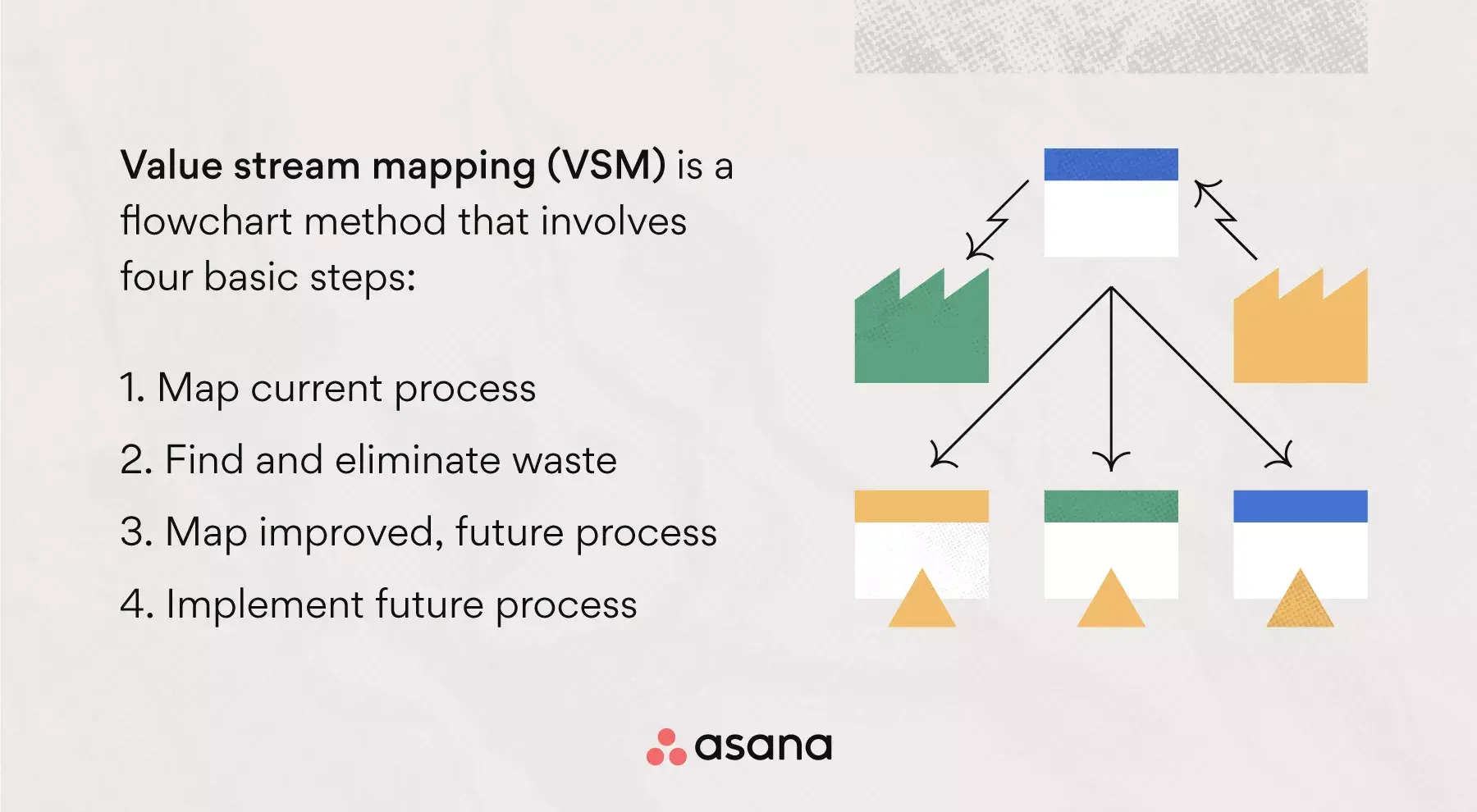
Value stream mapping (VSM) involves four basic steps:
Map current process
Find and eliminate waste
Map improved, future process
Implement future process
You may notice room for improvement in areas of your value stream map, such as:
Process flow
Lead and processing times
Equipment reliability
Raw materials/inventory
When you find waste in your production flow, like overproduction, mismanagement, or project defects, you can then manage these bottlenecks so your process flows smoothly.
Benefits of value stream mapping
Value stream mapping gives your team a clear visual tool to find inefficiencies and take action. Here are the main benefits:
Reduces lead time: By mapping every step of your process, you can spot unnecessary delays and remove them, so work moves faster from start to finish.
Identifies and eliminates waste: VSM makes it easier to see where resources, time, or effort are being spent on activities that don't add value for your customers.
Improves team communication: A value stream map gives everyone on your team a shared, visual understanding of how work flows, reducing confusion and keeping people aligned.
Supports continuous improvement: Because VSM involves creating both a current-state and a future-state map, it naturally encourages your team to keep refining processes over time.
Enhances resource use: When you can see exactly where materials, time, and labor go, you can ensure they're used as effectively as possible at every step.
When should you use value stream mapping?
Value stream mapping can bring big improvements to your business. However, it's not worth your time and effort if it doesn't match your needs. Here are some situations when you should use value mapping:
End-to-end improvement: To improve an entire business process from start to finish
Inventory management: To identify piled-up inventories in a process
Process optimization: To find opportunities to streamline and reduce waste
Complexity analysis: To learn the inherent complexities of a process
Systems understanding: To understand the IT systems used in a process
Customer service review: To assess the effectiveness of customer service channels
Process health: To visually display how well your processes are performing
Strategic review: To take a high-level look at your processes and plan improvements
As you can see, creating a value stream map provides insight into many parts of your workflow. Still, a value map might not help if your problem isn't related to information, product, or time flow.
How to create a value stream map
Value stream mapping has four basic steps, but you'll feel more prepared if you expand the process into nine steps. The first five focus on project planning, and having a solid project plan leads to better process improvements. From there, you can move into the four core steps of VSM with all the context you need.
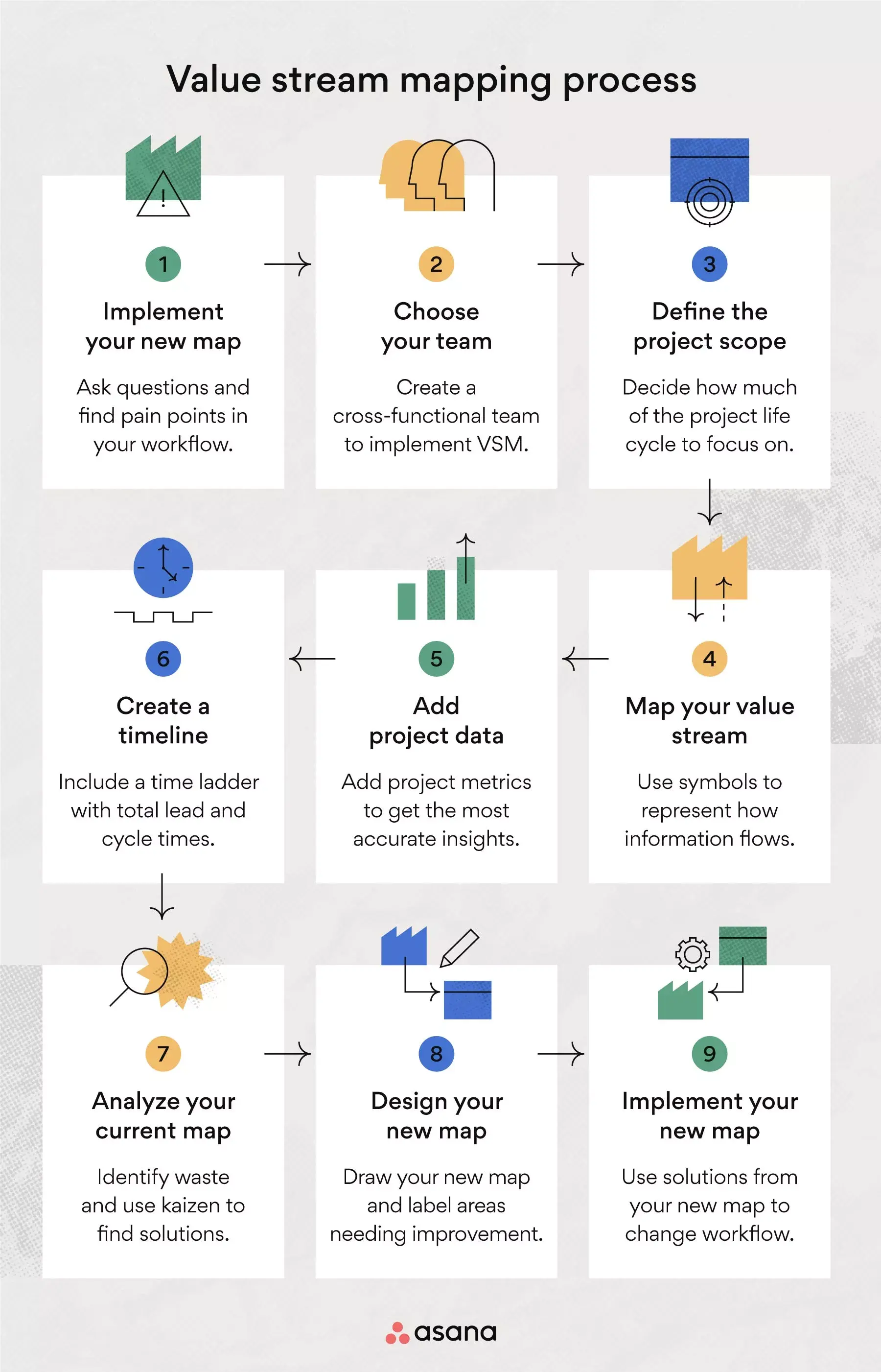
1. Identify the problem
Value stream mapping is useful for keeping your workflow running smoothly, but you can also use it to solve problems your team or customers are facing. For example, you might see that customer demand exceeds your available inventory. If you spot a problem but aren't sure why it's happening, you can bring it to your team and use VSM to find answers.
Tip: In this initial stage, brainstorm and ask questions to identify both internal and external inefficiencies. Put yourself in your customers' and your team members' positions to identify pain points.
2. Choose your team
You'll need a focused team to help you map the value stream, analyze it, and implement improvements. A cross-functional team with members from sales, operations, customer service, and design will give you the skills and perspectives you need. Depending on the problem you're solving, you may not need all of these departments, so choose wisely to keep the group efficient.
Tip: Include both executives and supporting roles on your VSM team to increase visibility into internal issues. Invite suppliers or other stakeholders to join your group if you want an outsider's perspective.
3. Define the project scope
Your value stream mapping exercise is a project of its own, which means you'll need to define your scope. If you don't define your project scope, you won't know how much process mapping your work processes need. Lack of a defined scope also makes it harder to identify and eliminate waste later on.
Tip: Use VSM only for one product at a time. Decide whether to map the product life cycle in its entirety or focus on specific process steps. For a software product, map the process from the initial feature request to customer delivery, and omit conditional steps that occur after handoff.
4. Map your value stream
Now that you've scoped your VSM, you can begin your map. Use value stream symbols (explained below) to build a workflow diagram that shows how information flows between your work activities. If you're mapping out your entire production process, your map will create a circle because the final stage should cycle back to the initial process step.
Tip: If you aren't sure where to start your value stream map, begin with the team member responsible for approving requests between a customer and a supplier. You can also visualize your map in three parts: the top for information flow, the middle for product flow, and the bottom for time flow.
5. Add project data
Once you have an illustration of your value stream, add relevant metrics to get the most accurate insights from this exercise. While the map alone can help you visualize certain aspects, you'll need to pair it with data boxes to compare time, quantity, and quality across all process steps.
Data points you can add to your map include:
Amount of inventory held for each step
Cycle time per unit
Transfer time
Number of team members needed to perform each step
Number of products scrapped
Number of products in each processing batch
Takt time (rate needed to produce products in order to meet customer demand)
Tip: The data you include in your map will vary depending on your industry, the process you're mapping, and what problems you hope to solve. Most data will fall within these three categories:
Office or support data
Manufacturing or shop data
Supplier or outside processing of data
6. Create a timeline
A clear timeline is essential to any production process, and delays can throw off your entire workflow. You'll dedicate the bottom third of your value stream map to time flow, using a time ladder with two rungs for lead time and cycle time. This ladder will give you a better sense of whether your lead time and cycle time are up to speed.
Metric | Definition | What it measures |
Lead time | The total time it takes for your team to complete a task, starting when a task first enters your workflow. | All operational processes, including wait times, leading up to and through production. |
Cycle time | The portion of lead time when you're actively completing a task. Also known as value-added time. | Only the active work time within the overall lead time. |
To figure out lead time, count the inventory you have before each process step and divide it by customer demand. For example, if you have four products ready before shipping and customers want two per day, your lead time is two days.
Tip: Lead time is closely tied to inventory management and customer satisfaction. If your lead time is too long, you'll have trouble predicting when to replenish your inventory. Your value stream map can help you optimize lead times before you find yourself behind on product delivery.
7. Analyze your current map
As you create your current flow map, you'll probably spot areas that could be better. Add project data to your value stream map to make waste easier to see. However, even if the areas of waste seem obvious, you should still set focused time aside for map analysis. Areas of waste in lean management include:
Overproduction (unnecessary features)
Inventory (mismanaged backlog)
Motion (task switching)
Defects (technical debt)
Over-processing (expensive tools)
Waiting
Transport
Fragmented teams
Tip: The best way to analyze your map is by performing kaizen bursts on any areas of waste you've identified. The word kaizen comes from two Japanese words: kai, meaning improvement, and zen, meaning good. You'll use kaizen bursts to generate value-adding ideas for the future state value stream map.
8. Design your new map
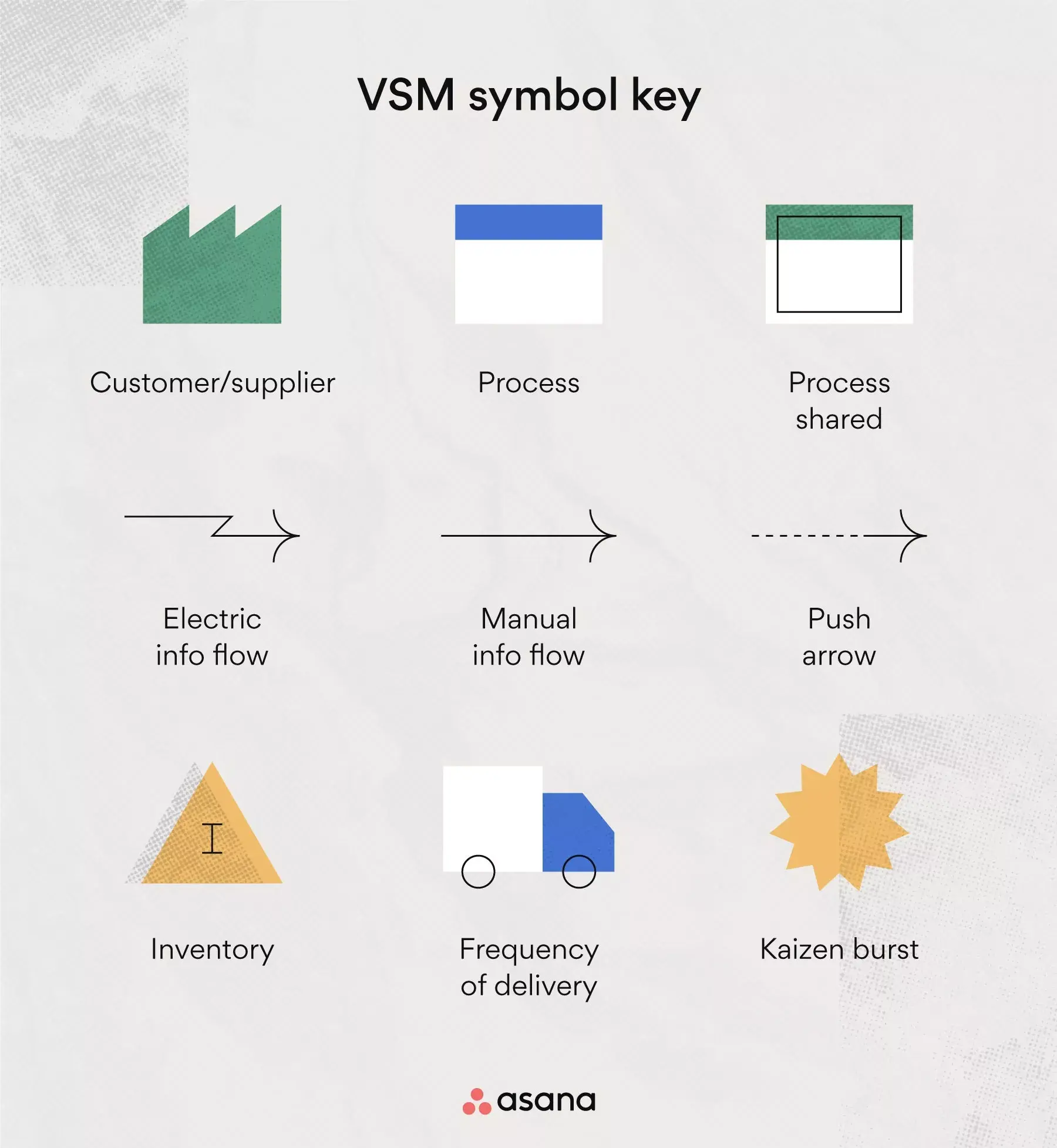
You're now ready to draw your future state value stream map. This map will look similar to your current map but will include kaizen elements for areas needing improvement. You can use Kanban software to implement a pull, or pull resources only when demand calls for them, and improve your flow of information. The specific symbols you add to your future state map will vary depending on your process. See the VSM symbol map below for visual representations of the following:
Supermarket: Represents a Kanban stock point where customers can get the inventory they need as soon as the supplier replenishes it.
Production Kanban: Indicates the need for the product to supply parts to a downstream process.
Material withdrawal Kanban: Instructs an operator to move parts from a supermarket to a process.
Signal Kanban: Used when inventory levels in a supermarket are low, and signals production of a specified number of parts.
Kanban post: Indicates the location for collecting Kanban signals, typically located near a supermarket.
Material pull: Represents the removal of stored inventory from supermarkets.
Sequenced pull: Eliminates the need for supermarket storage of inventory between processes by instructing a specified team to produce a custom order.
Tip: Use the value stream symbol map below to see what each symbol looks like and place them in your future state map accordingly. While the goal of your future state map is to simplify material flow, don't worry if your future state map looks more crowded than your current state map because of the symbols you've added.
9. Implement your new map
The last step in the VSM process is to implement solutions from your future state map into your work process through a structured change management process. This is where you'll see the analysis of your map pay off.
Sorting through clutter can feel messy at first, but once your space is organized, the benefits are clear. In the same way, finding and fixing waste in your process can be tough, but the result is a smoother workflow and happier customers.
Decision-making tools for agile businesses
In this ebook, learn how to equip employees to make better decisions—so your business can pivot, adapt, and tackle challenges more effectively than your competition.


Value stream symbol map
These symbols show information flows, work activities, and spots that need improvement in your processes. When you use VSM software, you'll have easy access to all these symbols.
Value stream mapping example
Below is an example of a current state value stream map. It shows how a product or service moves from the supplier, through your production chain, and finally to the customer.
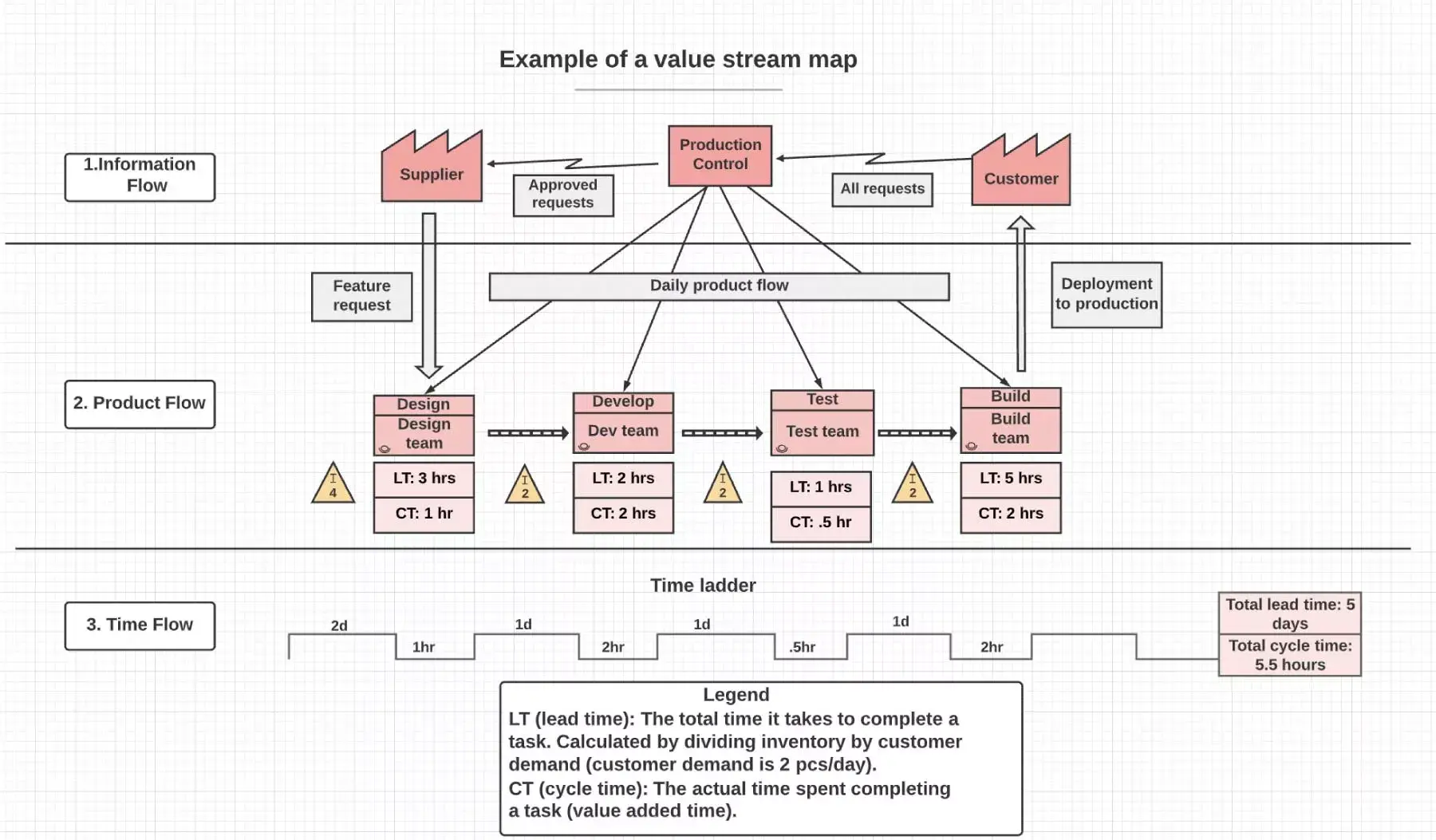
The value stream map starts at the top center with the team member who handles production control. This person approves customer requests or orders and sends them to the supplier. This example map is circular because customer demand drives both supply and production.
Common value stream mapping mistakes to avoid
Value stream mapping is a useful tool, but it's easy to make mistakes if you don't know what to watch for. Keep these common errors in mind as you create and improve your maps:
Overcomplicating the map: It can be tempting to capture every single detail, but a cluttered map is harder to read and analyze. Focus on the key steps and data points that matter most to your process.
Ignoring information flow: Many teams map only material or product flow, overlooking how information moves through the process. Both flows are essential for an accurate picture of your value stream.
Creating a map without an action plan: A value stream map isn't the end goal. Pair each current-state map with a future-state plan and clear next steps.
Mapping multiple products at once: Trying to capture several product families on a single map creates confusion and reduces clarity. Stick to one product or process family per map to keep your analysis focused and actionable.
By avoiding these mistakes, you'll get more out of value stream mapping and keep your team focused on real improvements.
Streamline your workflow with value stream mapping
If you're striving for continuous improvement, perform regular upkeep on your processes, just as you would with your home. While VSM can feel tedious, the outcome is a more efficient workflow with less waste and shorter lead times. Mapping your current and future value streams is easier with the right software. With Asana, you can visualize your processes, implement your improvement plans, and keep your team aligned every step of the way.
Get started and turn your value stream insights into action.
Decision-making tools for agile businesses
In this ebook, learn how to equip employees to make better decisions—so your business can pivot, adapt, and tackle challenges more effectively than your competition.